
A lot of iPhone users look for an easy method to secure pictures from view, and for many, that means just getting them out of the main view.
But simply hiding something isn’t the same as actually locking it down. Statista states that over 85% of people in the USA use their phones for photos and important personal stuff, so a massive pile of things we’d prefer to keep to ourselves is now on our devices.
Given that, it’s really good to understand what iPhone privacy settings do and don’t do. This article will show you how to make photos private on iPhone, what the downsides of that method are, and how to really protect the photos iPhone people depend on, utilizing much safer options like QEncrypt Vault.
How to Hide Photos on iPhone
If you’re trying to learn how to hide images on iPhone, Apple has made the process simple and easy to follow.
- To start, open your Photos app and choose the photo or video you’d like to keep to yourself.
- From there, tap the Share symbol, then look down the list of options and select “Hide.”
- Once you say yes to that, the image will go into the Hidden album.
When you’re ready to see those hidden treasures, go to the Albums section, then scroll down to the Utilities section and tap Hidden. And for an extra layer of keeping prying eyes away, you can switch “Show Hidden Album” off within the Settings for Photos.
This is great for a quick bit of privacy, to tidy up your photos or get certain images out of sight of anyone browsing. But do remember, this doesn’t lock or encrypt photos; it simply moves them to another place in the app.
How to Make Photos Private on iPhone
Lots of people who want to keep photos hidden on their iPhones think simply saving them in the hidden vault will do the trick. And hiding is a start, but Apple gives you a little bit more you can do to have more privacy.
You can lock your iPhone with Face ID, your fingerprint (Touch ID), or a really good phone password. This stops people from getting into your phone in the first place and, therefore, getting at your photos. With more recent iOS updates, Apple even lets you use Face ID or Touch ID to lock the Hidden album.
But all these methods only protect things on the phone itself. They don’t actually change how your photos are saved on the iPhone.
So, while it’s harder to get to your photos, they aren’t put somewhere completely safe and encrypted or in a separate, protected space.
What Happens When You Hide a Photo?
Understanding what happens behind the scenes is key if you want to truly keep photos private iPhone users depend on.
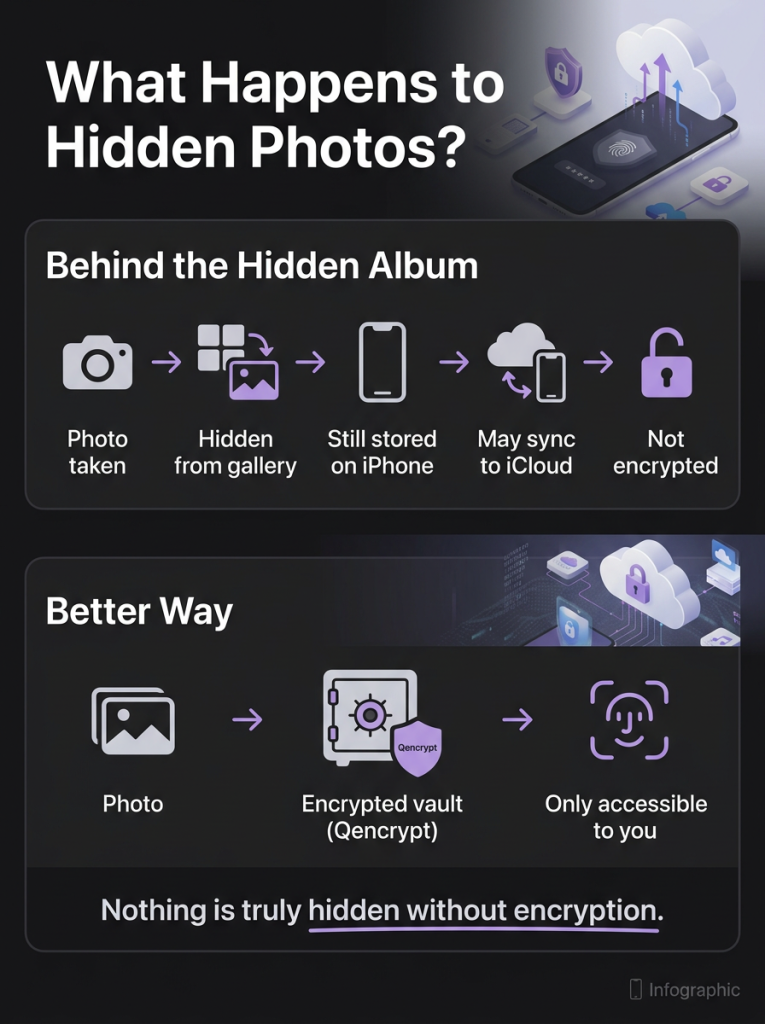
When you hide a photo:
- It is removed from your main gallery view, so it no longer appears in your timeline, widgets, or general browsing sections
- It is placed in a Hidden album, which acts as a separate folder within the Photos app but is still part of the same system
- It remains stored in your device’s photo library, meaning the file itself is unchanged and still exists in your storage
- It may still be included in backups or synced through iCloud, depending on your settings and account configuration
Why Hiding Photos Is Not Enough
Just putting photos out of sight doesn’t really safeguard them, and for anything truly personal, it’s surprisingly flimsy. There are a lot of reasons why.
- No Data-Level Protection
They aren’t protected at the file level; hidden photos are still on your phone in a way anyone can read, and if somebody gets really into your phone or where your stuff is stored, they’ll be able to see or get back those pictures.
- Access Depends on Device Security
How safe your hidden photos are rests completely on how secure your phone itself is. If anyone knows your phone’s lock, gets at your phone when it’s open, or manages to get into your Apple ID, they’re likely to find those hidden files. Basically, if your phone isn’t secure, your hidden things aren’t safe.
- iCloud Sync Risks
And if you use iCloud Photos, your hidden images might well turn up on all your other Apple devices – on your iPad, your Mac, and so on. This means they’re more likely to be accidentally shown to someone.
- Limited Control Over Files
You have very little power over these hidden files. You can’t decide who gets to see each one, add another layer of security to specific images, or limit how they’re looked at or passed around. And that makes it hard to be truly secure with important personal information.
Qencrypt Vault: A Smarter Privacy Solution
If you’d like to really be in charge of your privacy and have much better security, Qencrypt Vault is a good, usable choice.
It’s not just about concealing things; this tool lets you bring in your photos, videos, and documents, scramble them up with encryption, and then keep them in a completely private “vault”.
This protects your files on a deeper level than just hiding them from being seen.
What sets Qencrypt Vault apart is its emphasis on you being fully in control and having safe ways to manage your files. Within the app you can safely get at your encrypted files, arrange them into folders, and get them out again when you require them. It builds a less messy, private area for all your important information, and keeps it separate from the rest of your phone or tablet.
You can also use secure ways to get into it, for example by confirming it’s you with your device, so only people who should be able to open the vault can. That’s an additional security measure, on top of your normal phone security.
How Qencrypt Vault Protects Your Data
Qencrypt uses very strong encryption methods created for today’s security requirements and to protect things for a long time.
At its heart, it uses these:
- CRYSTALS-Kyber is a way to safely swap the ‘keys’ to your encryption, so your information is safe whether it’s saved on your computer or being sent to someone else. It makes it harder for people to overhear or get into your stuff.
- Classic McEliece is incredibly hard to break with even sophisticated methods. It’s for long-term security and should remain secure as computers become more powerful.
- CRYSTALS-Dilithium makes sure files are really what you think they are and haven’t been messed with. It proves your information hasn’t been altered, which is vital for trusting and relying on it.
- Falcon is a quick and effective way to check if something is secure, while still being very strong on security. This helps to make both getting access and confirming something is legitimate fast and safe.
- SPHINCS+ gives another level of safety for the long haul using complicated encryption. It’s made to be dependable in the future, even with changes in technology.
All these things combined are a post-quantum security system. This means they’re intended to cope with security problems in the future as well.
Hidden Photos vs Qencrypt Vault
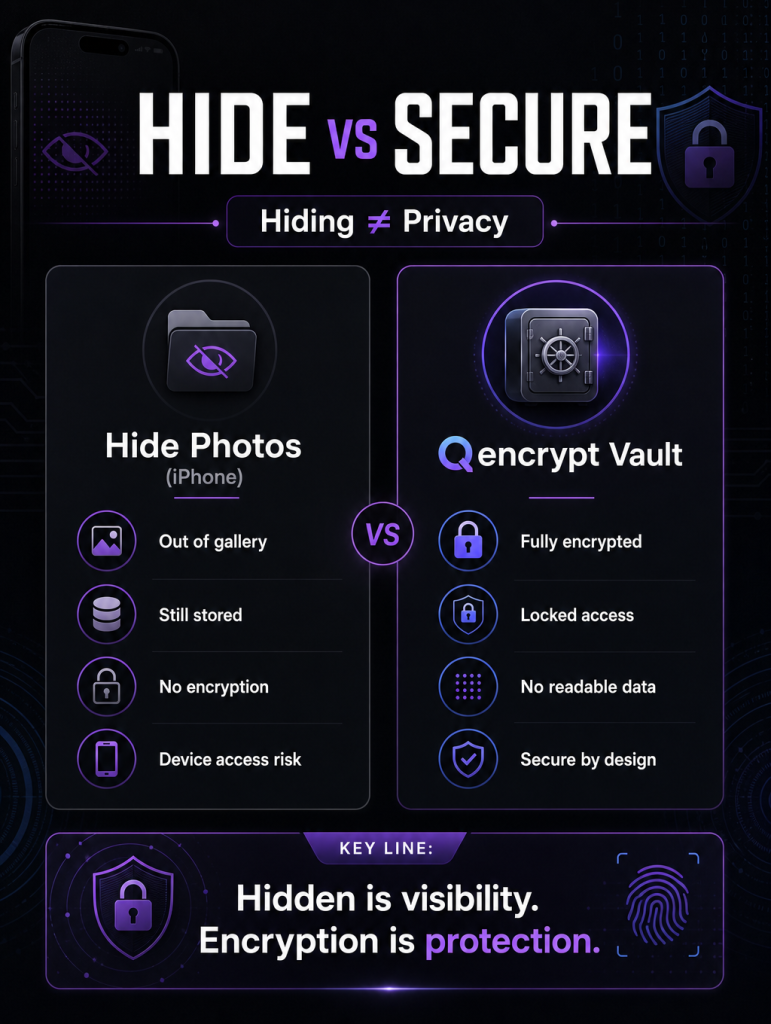
When you hide photos on your iPhone, you’re just making them disappear from your normal view. They’re still on your phone, aren’t encrypted in any way, and are only as safe as your phone’s usual security.
Qencrypt Vault, on the other hand, encrypts your files before it saves them. So, the information is what’s protected. You need to prove you are you to get in, and your files stay safe even if someone gets a copy or opens them using something other than the app. This is a much better and more dependable method for safeguarding truly important stuff.
Conclusion
It’s useful to know how to hide photos on iPhone for organizing your pictures and for keeping some of them private. But “hiding” them isn’t a very good way to protect them.
Since we’re putting more and more personal and confidential details on our phones, just controlling who sees something isn’t enough. People who really need their iPhone photos to be private need something stronger that protects the information at a more fundamental level.
That’s where encryption comes in. Rather than only conceal files, encryption scrambles them, so they are unreadable to anyone without permission. Qencrypt Vault does just that, encrypting your files and then keeping them in a safe, secure place. If you are careful about privacy and want to be in charge, it’s a more intelligent and dependable way to safeguard your important things.
Are you waiting for a data breach or ready to act now?