
Because of ransomware, data breaches, & account-takeover fraud, the way businesses keep confidential details safe is completely changing. Encryption isn’t just a beneficial way to be secure anymore; it’s essential.
And at the very moment we’re getting a handle on that, newer technologies, notably quantum computing, are showing up with the potential to crack all the usual kinds of encryption. So, using encryption methods that can’t be broken by quantum computers is quickly turning from something you might want to do to something you pretty much have to do.
This blog will help you understand how encrypting files and folders works and why it’s important, even if you’re a beginner. It will also look at why encryption that can withstand quantum computers is so important; useful encryption tools for you to start using now and how protecting at the application level (as opposed to just at the file level) makes your security much stronger.
What Is Encryption and Why It Matters
Think of encryption as a clever way of encrypting information you want to keep private, using a kind of mathematical algorithm and a ‘key’. Only people who have that specific key can decrypt it and get back to the original information.
Encryption can protect:
- Personal files (photos, documents)
- Financial records
- Business data
- Emails and communications
If you don’t encrypt things, then as soon as someone manages to get their hands on your private files, through a hacker breaking in, a thief stealing a device, or even you accidentally sharing them with someone, they can understand everything in them immediately. Encryption, though, is like adding a strong lock. Even if your data is seen or falls into the wrong hands, it will be complete nonsense to anyone who doesn’t have the key, meaning it’s utterly useless to them.
Top 3 Types of Encryptions in 2026
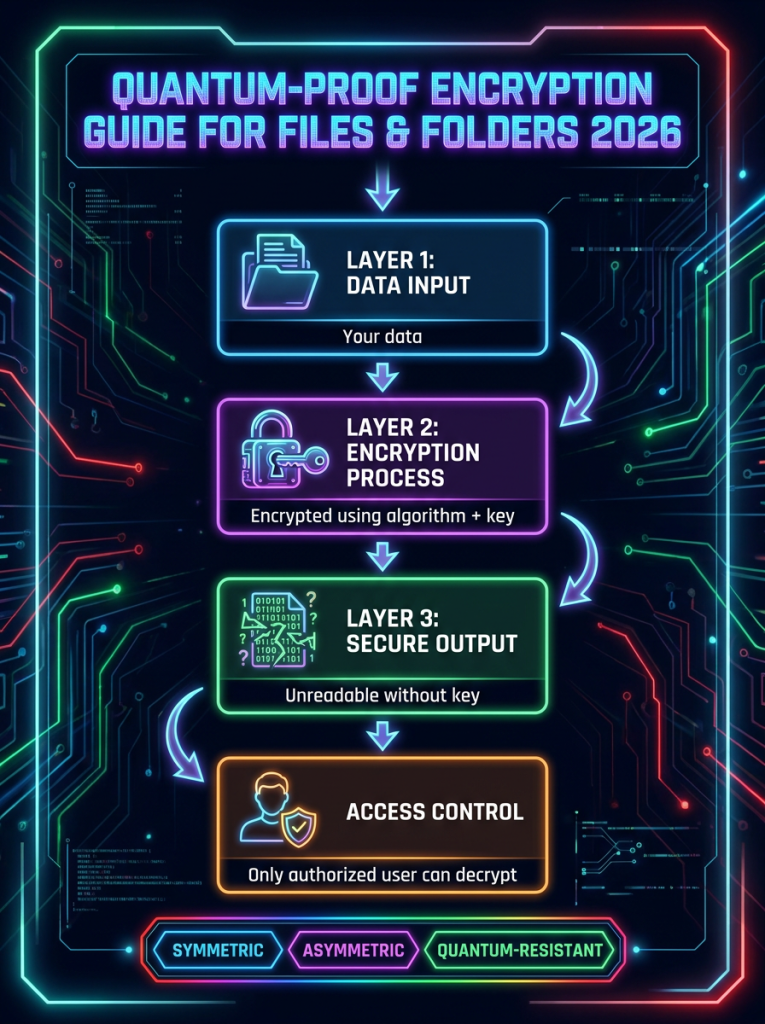
Here are a few encryption types you’ll often hear about:
1. Symmetric Encryption
With symmetric encryption, one and the same key locks and unlocks your information. It’s really quick and good at its job, yet getting that key to the right people safely is crucial.
2. Asymmetric Encryption
Asymmetric encryption, or public-key encryption, employs a pair of keys: a public key for encrypting your data and a secret, private key for decrypting it. It’s a hugely popular choice for keeping conversations secure and for creating digital signatures.
3. Quantum-Resistant Encryption
Finally, quantum-resistant encryption is different. Unlike the usual ways of encrypting, it’s built to survive attacks from quantum computers. It leans on complex mathematical algorithms that even the quantum computers of the future will likely find hard to crack.
What Makes Quantum-Proof Encryption Important
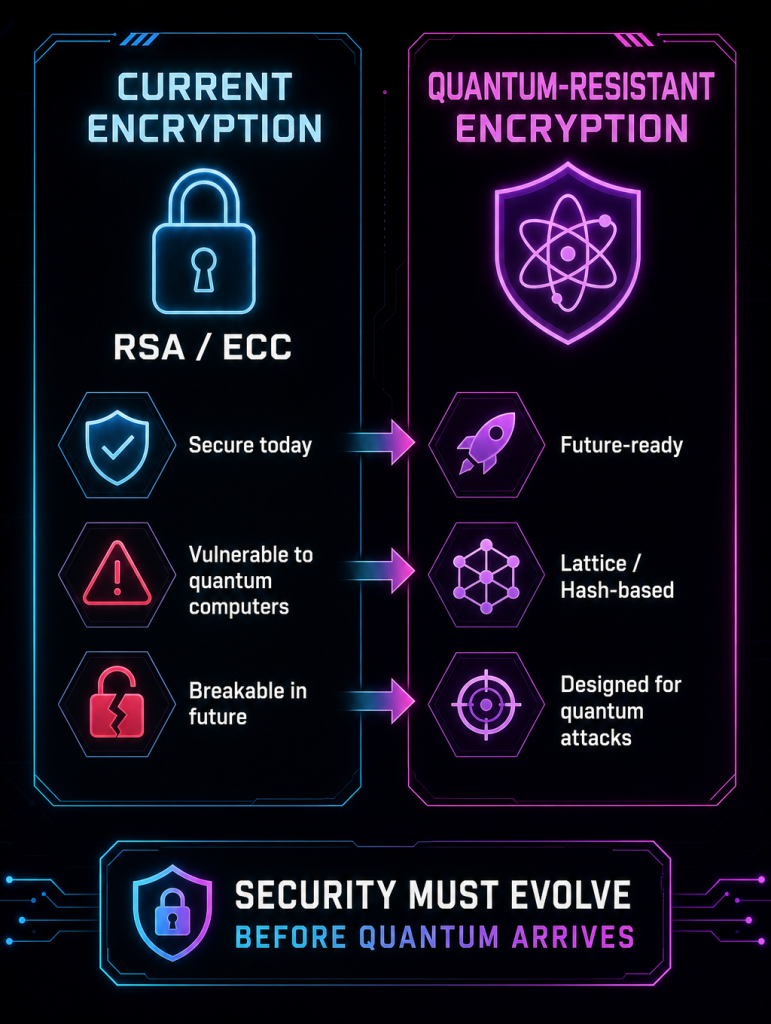
Quantum computing is rapidly gaining significance in the global cybersecurity landscape. Quantum computers, with their incredible power, could completely break the usual ways we keep things secret (like RSA and ECC).
Quantum-proof cryptography means using encryption systems that quantum computers can’t crack. And that’s done with algorithms like lattice-based cryptography, hash-based signatures, and code-based encryption. These are the basic ideas behind building encryption that will actually defend your data from quantum computers for many years in the future.
Though they’re not quite fully here yet, it’s suggested that organisations need to start preparing for the post-quantum era.
Common Ways to Encrypt Files and Folders
1. Built-in Operating System Tools
Most operating systems offer native encryption features:
- Windows: Encrypting File System (EFS) allows you to encrypt individual files or folders.
- macOS: FileVault encrypts the entire disk.
These tools are easy to use and require minimal setup. However, they may lack advanced features like sharing control or cross-platform compatibility.
2. Password-Protected Archives
You can compress files into ZIP folders and protect them with a password.
Steps:
- Select files
- Compress into a ZIP archive
- Add a strong password
While simple, this method depends heavily on password strength and may not provide enterprise-level security.
3. Dedicated Encryption Software
Applications designed for encryption provide stronger protection and additional features such as:
- Secure sharing
- Access control
- Audit logs
These tools often support application encryption, which protects data directly within the app rather than relying solely on system-level security.
4. Cloud-Based Encryption Services
Modern cloud platforms allow you to encrypt files before uploading them. This ensures that even the service provider cannot access your data.
This approach is often referred to as application layer encryption, where encryption happens at the user level rather than the server level.
Step-by-Step: How to Encrypt a File
Here is a simple beginner-friendly process:
- Choose an encryption tool (built-in or third-party)
- Select the file or folder
- Enable encryption
- Set a strong password or key
- Save the encrypted version securely
In addition to this, to add further protection, organisations can:
- Use long, complex passwords
- Store keys in a secure password manager
- Back up encrypted files safely
Encrypting Entire Folders and Directories
Encrypting folders works similarly but offers broader protection. Instead of securing individual files, you encrypt an entire directory.
Benefits include:
- Easier management
- Consistent protection
- Reduced risk of accidental exposure
Email and File Sharing Encryption
Encrypting files is only part of the equation. You also need to secure how those files are shared.
Best Practices to share files without compromising security:
- Use encrypted email services
- Share files through secure links
- Set expiration dates and access permissions
This ensures your data remains protected during transmission, not just at rest.
Application Encryption vs. System Encryption: Everything You Need to Know
- System-Level Encryption
When we talk about full device encryption, we mean encrypting all the information on a phone, laptop, or entire hard drive. As soon as you turn it on, everything on the device gets encrypted. It’s intended to shield your information when it’s just sitting there, particularly if someone gets their hands on your device.
This encryption for the whole system does a few things:
- It secures data on the device itself
- Encrypts the entire hard drive
- And importantly, protects operating system files too
After you set it up, it happens by itself; you don’t have to do much of anything. This makes sure your details are safe should you lose your phone or your laptop is stolen. But it’s important to understand that you won’t keep things private once you unlock the device and are using it.
- Application Encryption
Instead of trying to lock down the entire system, application encryption zeroes in on securing the information within a particular program. So, a messenger, for instance, might encrypt its messages with encryption, meaning only the person sending and the person receiving can decipher what’s said. It doesn’t matter how secure (or not!) the phone or computer itself is.
Application encryption specifically safeguards the data inside particular apps, encrypting things like files, messages, or completed purchases as they are created. This gives you a much more detailed ability to decide who gets at your information, enabling options like limiting access to certain people based on their role or being able to securely share.
Importantly, it isn’t at the mercy of the security of your device’s operating system, and your details stay encrypted even while you are actively using them or as they’re moving from one place to another.
Best Practices for File Encryption
To maximize your security, follow these guidelines:
- Use strong, unique passwords
- Enable multi-factor authentication (MFA)
- Regularly update encryption tools
- Avoid sharing encryption keys insecurely
- Back up encrypted data
Additionally, educate users and employees about encryption practices to reduce human error.
The Role of Quantum Encryption Companies
Because the danger from quantum computers breaking current security is getting bigger, companies specializing in quantum encryption are building seriously clever ways to make sure our information stays safe for the future.
These organizations focus on:
- Post-quantum cryptography
- Secure key management
- Scalable encryption systems
And with all this work, they’re really determining what cybersecurity will look like in the coming years.
Why Choose QEncrypt
Encrypting your files isn’t only about keeping your data safe right now; it’s about getting ready for the time when quantum computers are readily available. Because quantum computing is coming, organizations will need security that’s better than the encryption we normally use. And that’s where QEncrypt comes in, a tool specifically created to do this job and to be easy to use while offering encryption that will be secure even in a quantum world.
QEncrypt uses quantum-proof cryptography to protect your files, folders, and how you communicate, so your information is safe from today’s cyber dangers, as well as the quantum attacks of tomorrow. It works easily with encryption within applications and at the application level, offering you far more precise power over your data’s security and over exactly where it’s secured.
QEncrypt is based on quantum-resistant algorithms that have been tested and are solid and incorporates algorithms for resisting quantum attacks that are known and respected around the world, making for a strong and lasting defence for your information.
- CRYSTALS-KYBER: Key Encapsulation for secure data exchange
- Classic McEliece: Highly resilient key encapsulation mechanism
- CRYSTALS-Dilithium: Efficient and secure digital signatures
- FALCON: Lightweight, high-performance digital signatures
- SPHINCS+: Stateless, hash-based digital signatures for maximum security
These algorithms are part of the new generation of quantum computer encryption standards, specifically designed to resist attacks from both classical and quantum systems.
Want to prepare your business against quantum-era threats?